akaBot

Collaboration Center
Connecting people and automation in one continuous process
akaBot is an enterprise RPA platform that helps businesses automate and manage their processes. I designed its Human-Bot collaboration experience to connect bots with people when human review, input, or decisions are needed, while keeping the process moving seamlessly.
YEAR
2023
ROLE
Product Designer
CONTRIBUTION
UI Design - Interaction Design
TEAM
1 PO - 2 BA - 3 Developers
STATUS
Released & Implemented
01 / Context
When Automation Needs Judgment
Bots are effective at repetitive, rule-based work. However, complex business processes often contain moments that require human judgment, confirmation, or additional information.
Example: Credit Approval Process
START
Application received
→
BOT
Check credit data
→
BOT
Propose credit limit
→
HUMAN
Review & approve
→
BOT
Update system
→
BOT
Notify customer
"Without a way for people and bots to exchange information within the same workflow, processes requiring human judgment could not be automated end to end."
02 / product Challenge
Bridging People and Automation
The same business process is understood differently depending on the user’s role. RPA specialists (RPA Dev/BA) think about how the process is configured and executed, while business users focus on the information they need and the actions they need to take.
RPA SPECIALIST BUILDS
"How should this process work?"
Understand Business Process Logic & Flow
Configure Bot Task
Define Human Task
Set Logic and Conditions
Map Data
BUSINESS USER ACTS
"What do I need to do?"
Understand Context
Review Relevant Information
Make Decision
Provide Input / Take Action
Continue The Process
“The challenge wasn't to simplify the entire system, but to expose the right level of complexity to each user. “
03 / Solutions
One Connected Experience
Instead of treating automation configuration and human interaction as separate experiences, I designed them as parts of one continuous process.
RPA SPECIALIST BUILDS
PROCESS DESIGNER
Define how bots and people work together
RPA SPECIALIST BUILDS
FORM DESIGNER
Define what information people receive and provide
BUSINESS USER ACTS
PROCESS MANAGEMENT
Start new automation task or review current running tasks
BUSINESS USER ACTS
HUMAN TASK
Review, decide and return information to the process
AUTOMATION
CONTINUES
↺
PROCESS DESIGNER
Define where human enter
the automation flow
Each Human Task needed an interface through which business users could understand information, provide input, and make decisions.


Components
Configuration
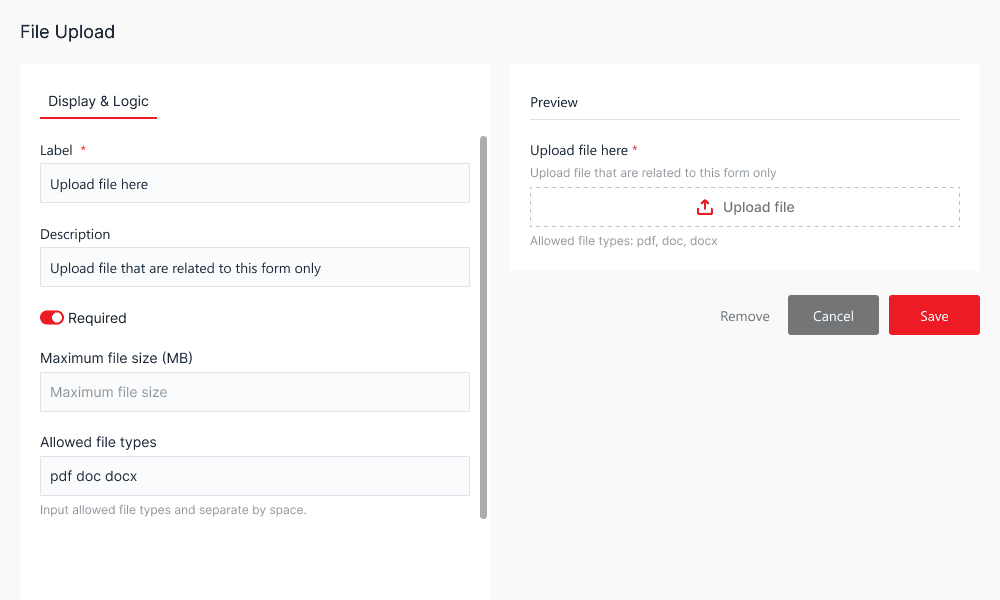
FORM DESIGNER
Configure the human side of the process
RPA specialists construct the business process visually, combining automated tasks, human tasks, logic, conditions, and data.


Components
Configuration
PROCESS MANAGEMENT
See the process as it runs
Used by Business Users to start or stop a process and monitor its execution. The same process diagram created by the RPA Specialist becomes a live view showing how data and tasks move through the process and the current status of each step.

Task Statuses


HUMAN TASK
When human judgment is needed
When a process reaches a Human Task, Business Users can review information, make decisions, provide input, and submit their response through a responsive interface across different screen sizes, allowing the automated process to continue without requiring them to work from the process-management interface.


Responsive Interface

04 / Outcomes
Making Human Participation Part of the Process
Collaboration Center was released and implemented as an extension of akaBot Center, enabling automated tasks and human decisions to operate within the same business process.
START
Application received
→
BOT
Check credit data
→
BOT
Propose credit limit
→
HUMAN
Review & approve
→
BOT
Update system
→
BOT
Notify customer
"Automation no longer had to stop where human judgment began."
05 / REFLECTION
Clarity isn't always about removing complexity
Human Collaboration taught me that complex systems do not necessarily need to become simpler. They need to reveal the right complexity to the right person.
Designing across both sides shifted my focus from simplifying the whole system to deciding what each user actually needed to see, understand, and control.
COMPLEXITY
UNDERSTANDING WHAT MATTERS TO USERS
CLARITY